Colony Counter: count colonies from a plate photo, CFU/mL
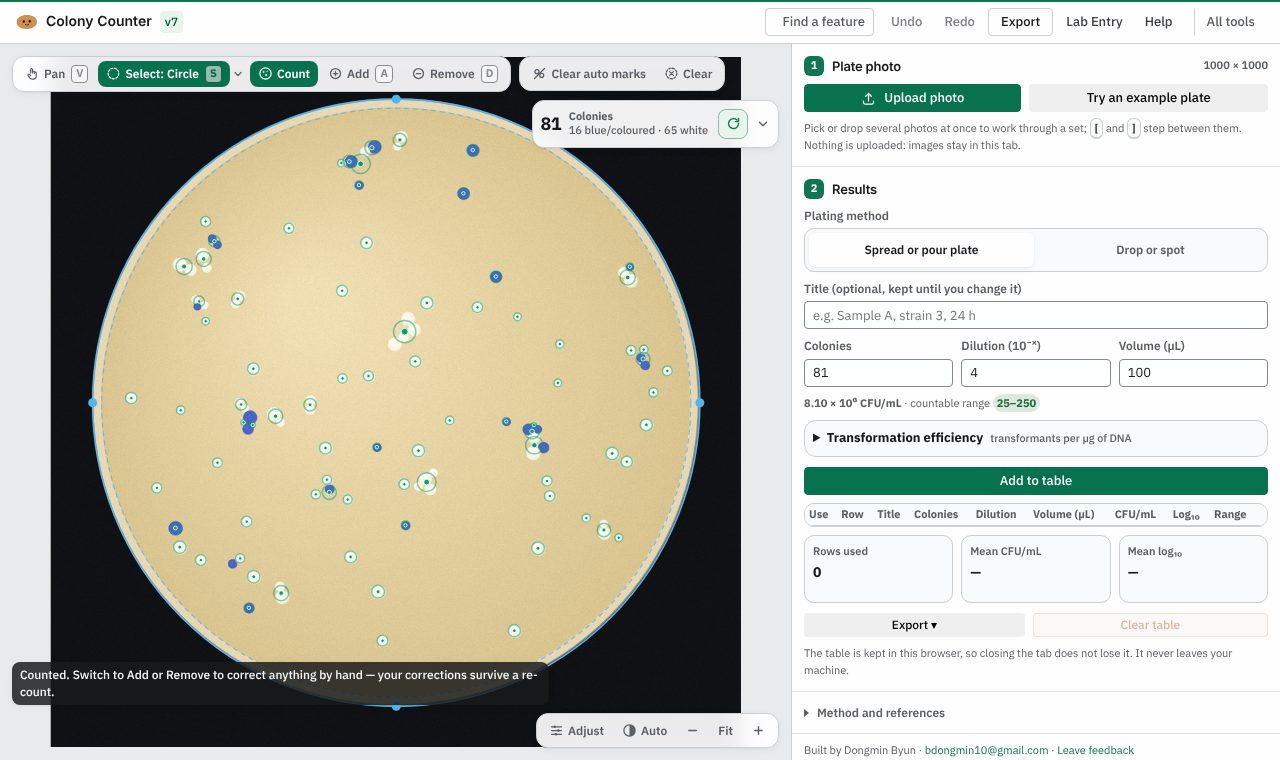
Count colonies from a plate photo, then get CFU/mL and transformation efficiency. Free, and your photos stay on your computer.
Open Colony Counter
Version 7, updated 11 November 2026. No install, no account.
✨ What it does
- Finds the dish and counts, even colonies that touch
- Click to add or remove marks, with undo
- CFU/mL for spread, pour, drop or spot plates, from your dilution and volume
- Transformation efficiency in transformants per µg of DNA
- Exports an Excel workbook, and the marked-up plate as a picture
🪜 How to use it
- Open Colony Counter and press “Try an example plate”, or “Upload photo” for your own (JPEG, PNG or TIFF)
- Let it count, then fix anything it missed with Add and Remove
- Choose spread or pour plate, or drop or spot, enter the dilution and volume, and press “Add to table”
- Export the table as an Excel workbook, or save the marked plate image
❓ Common questions
Is Colony Counter free?
Yes. Every Lab Potato tool is free, with no account and no trial period.
Are my plate photos uploaded anywhere?
No. The photo is counted inside your browser and never leaves your computer.
Which photos can it open?
Photos from a phone, a camera or a plate imager, as JPEG, PNG or TIFF.
Can I correct the count?
Yes. Add or remove marks by clicking, and undo any change.
🧰 More free tools for the wet lab
- Lab EntryNotebook & day planner
- Gel LabelerGel & blot figures
- Gibson AssemblyGibson primer design
- Microscopy Image LabelerMicroscopy figures
- Protein QuantA280 & protein yield
- Cryobox LabelerFreezer box inventory
- Doc ReaderRead & mark up papers
- Sequence StudioPlasmid maps & primers