Sequence Studio: a plasmid editor for SnapGene and GenBank files
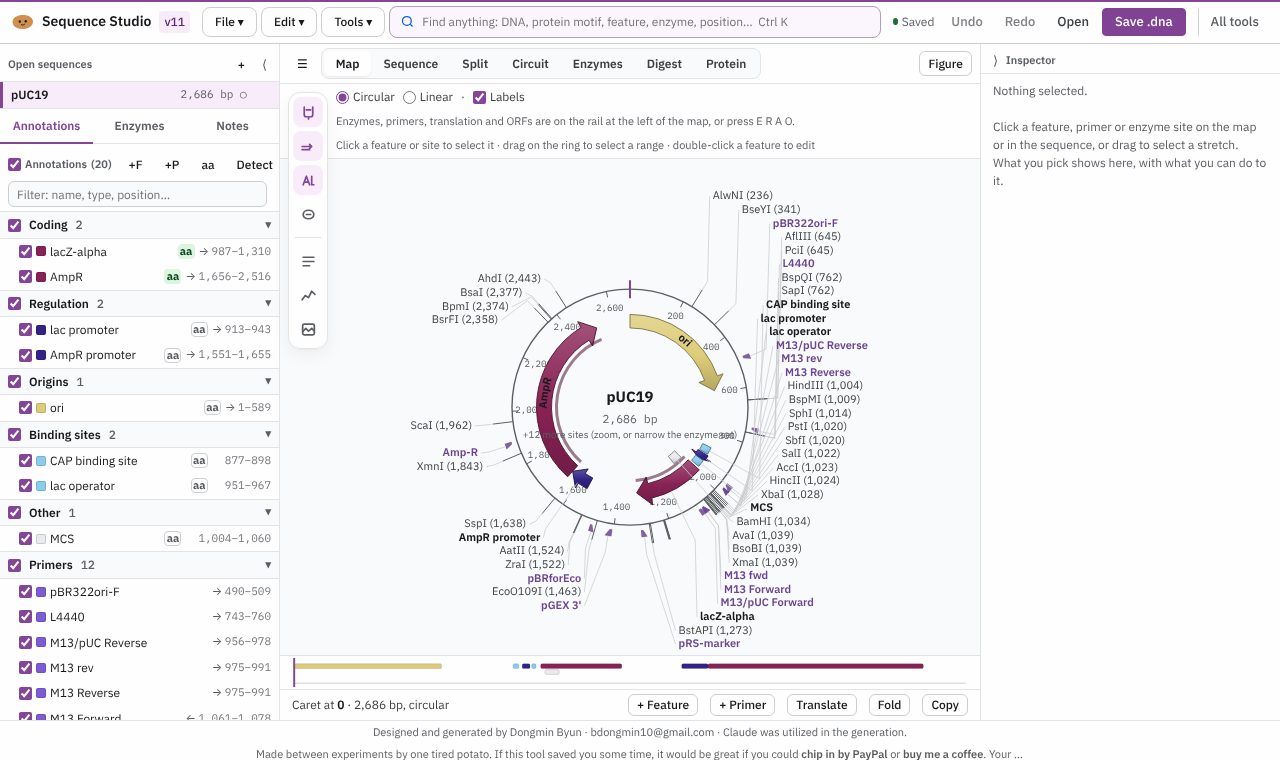
Open SnapGene, GenBank and FASTA files to see the map, annotate, cut, design primers and translate, in one browser tab. Free.
Open Sequence Studio
Version 11, updated 11 November 2026. No install, no account.
✨ What it does
- Reads and writes SnapGene .dna, GenBank, FASTA, EMBL and Xdna
- Plasmid map, sequence and split views, with features and primers
- Restriction digests and a ligation check
- Primer design with Tm, translation and codon optimisation
- A circuit view in SBOL symbols, with predicted ribosome binding strength
🪜 How to use it
- Open Sequence Studio and open or drop in a sequence file, or press “Try pUC19”
- Switch between Map, Sequence and Circuit views
- Add features and primers, run a digest or translate a region
- Save as SnapGene .dna, or export the map as a figure
❓ Common questions
Is Sequence Studio free?
Yes. Every Lab Potato tool is free, with no account and no trial period.
Do I need SnapGene?
No. Sequence Studio opens and saves SnapGene .dna files itself, as well as GenBank, FASTA, EMBL and Xdna.
Are my sequences uploaded anywhere?
No. Your sequences stay in your browser. For protein folding it prepares a job for AlphaFold Server, which you open and submit yourself.
Can it check a restriction cloning plan?
Yes. Run a digest, then use the ligation check on the fragments.
🧰 More free tools for the wet lab
- Lab EntryNotebook & day planner
- Colony CounterPlate counts & CFU/mL
- Gel LabelerGel & blot figures
- Gibson AssemblyGibson primer design
- Microscopy Image LabelerMicroscopy figures
- Protein QuantA280 & protein yield
- Cryobox LabelerFreezer box inventory
- Doc ReaderRead & mark up papers